As we all know, most people shop online nowadays. So it has become very important to present your products through pleasing photographs in a way that attracts more customers. As 79% of e-commerce purchases begin on a mobile device, it is required for your e-commerce brand’s products to look impressive on smaller screens. For product photography, no such DSLR or other professional camera is required, as many fashion labels and consumer goods companies actually run entire social campaigns shot on an iPhone. With this free guide, you will learn everything about mobile-first product photography for e-commerce.
Also Read: Best Camera for Product Photography
What Your Phone Camera Can (and Can’t) Do for Product Photography
Now, let’s just be honest, we all know the cameras of modern smartphones are really appreciable for a wide range of product photography. But not all guides will tell you what your phone camera can not do. Don’t worry, we’re here for that. With the camera of the iPhone 15 Pro, Samsung Galaxy S24 Ultra, or Google Pixel 8 Pro, one can easily click social media pics, Shopify catalogue images, and general e-commerce listings. But while capturing the jewellery and garments, your phone’s camera might miss those fine details that customers want to see through photos while shopping.
Setting Up Your Mobile Product Photography Space
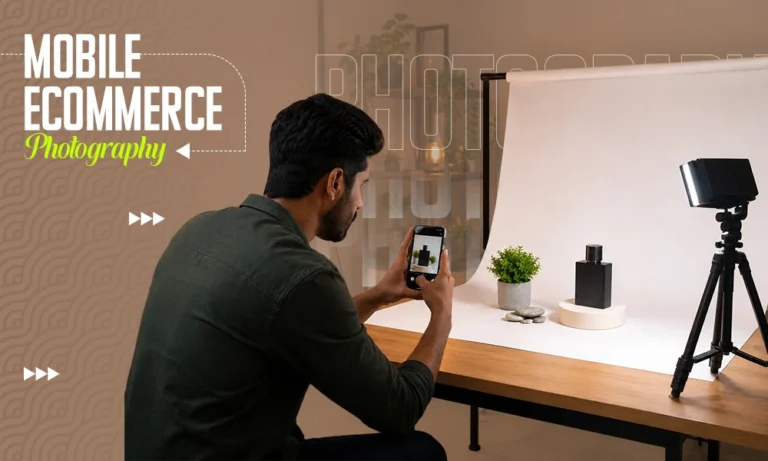
You do not need a studio for product images optimized for mobile shoppers. A consistent background and a clean surface define the entire look of your image. A sweep paper background is the best for professional and clean photographs. Whereas a fabric background works well for lifestyle and cosmetic shoots. A large sheet of white foam board is the easiest and most accessible option for a reflective background. A basic tabletop tripod is a must to escape those micro-blurs in photographs, which does not cost you much either. Then find the space where the lighting is nice enough for your setup.
The Best DIY Backgrounds for Mobile Product Shots
- White foam board for Amazon and Shopify catalogue shots.
- Kraft paper for food, skincare, handmade, and organic product shots.
- Black velvet or dark card is ideal for jewelry, electronics, and premium products.
- Marble contact paper is popular for cosmetics and food.
- Wooden boards or tiles for rustic or artisan products.
Also Read: How to Choose the Best Background Color for Product Photography
Natural Light vs Ring Light: What Works Better for Phones?
Usually, natural light is preferred for product photography with a smartphone. For lifestyle shots, apparel, food, and textured products, always go with natural light. And in case of catalog shots, use a ring light or small LED panel.
Phone Camera Settings for Product Photography (The Exact Checklist)
For mobile-first product photography e-commerce work, auto mode may not give the results that a few setting changes can provide:
- Grid lines: Switch to ON. Grid lines for consistent photographs throughout the catalogue.
- Pro / Manual mode: For product photography, switch to manual mode.
- ISO: ISO controls your phone’s sensor reactivity towards the light. Hence, keep it at the lowest possible.
- RAW shooting: Always shoot with iPhone ProRAW and Android RAW for more flexibility in editing.
Settings checklist:
Grid lines: ON
Mode: Pro / Manual
ISO: 50–100
RAW: ON if available
Shutter speed: 1/60s or slower (phone on tripod)
White balance: Manual, matched to light source
Focus: Tap and lock on product
Best Shooting Angles for Every Product Type
The angles of the photos directly affect their reliability, as a wrong angle can hide your product’s best feature. Here’s at what angle you should proceed for different products:
- For a flat lay angle, a photograph is taken from a top angle, which is best for accessories, food, stationery, skincare products, and folded apparel.
- A camera at the same height as the product, meaning an eye-level / straight-on angle, is best for packaged goods, bottles, boxes, and electronics.
- For a 45-degree elevated angle, the camera must be in front of the product and slightly above the product’s height, then facing the product by leaning forward a little bit, around 45 degrees. Best for furniture, footwear, bags, and 3D products.
- A hero shot could be from any angle that tells the story of the product, usually used for Instagram, homepage banners, and lifestyle sections of product pages.
Quick decision table:
| Product Type | Best Angle |
| Apparel (folded) | Flat lay |
| Apparel (worn) | Eye-level |
| Jewelry | Macro close-up |
| Food & Beverage | 45-degree |
| Cosmetics / Skincare | 45-degree |
| Electronics / Hard goods | Eye-level / straight-on |
Best Apps for Editing Product Photos on Your Phone
If you’re shooting on your phone, that doesn’t mean you have to edit on your phone as well. But if you’re planning to, here are some tips from our side:
- Lightroom Mobile is the most effective tool for catalogue work. By its way of handling RAW files, you get control over highlights, shadows, and tone curves. If you are a seller trying to keep phone screen product photo sizing consistent in a catalogue, the preset sync feature of Lightroom Mobile can help.
- Snapseed is free and still pretty powerful. The selective tool lets you brighten or fix only certain parts, without changing the entire picture. So it’s handy when you need to lift a shadow on one side of a product, without turning the background into some overexposed mess.
- VSCO is great for lifestyle and social posts where a consistent aesthetic vibe, like a stylistic filter, is needed across your Instagram feed. It’s less helpful for catalogue work since color accuracy is the real priority there.
When Mobile Editing Isn’t Enough: The Case for Professional Product Photo Editing
Let us just be honest and accept that mobile editing apps can give you good results, but professionalism is actually required for e-commerce images for mobile conversion. There are many things that mobile editors are failing to provide, and the outcomes that e-commerce sellers are facing:
- Background removal precision: Results in rough, unnatural cutouts.
- Ghost mannequin editing: Actual shape and structure won’t be defined.
- Clipping paths: Images struggle to meet the technical requirements of professional product catalogues.
- Color consistency across 100+ images: Different white balance, different shadow depth, different tone.
This is where professional photo editing is not just an extra cost but becomes a practical solution due to requirements. And that is what Visuals Clipping is here for, as we work directly with mobile-shot images to turn them into product images optimized for mobile shoppers.
Mobile Photography for Specific Platforms: Amazon, Shopify, Instagram
Amazon
Amazon‘s hero image rules are strict. The main product picture has to be taken against a pure white background, and the product itself should take up at least 85% of the whole frame.
Shoot with your best white surface first, then swap it for true white during post-processing, professionally. For proper phone screen Amazon sizing, you basically crop and resize to a 1:1 square ratio before you upload.
Shopify
Shopify does not really force background requirements, but consistency across the store is what makes it feel polished and helps with e-commerce image for mobile conversion.
The tricky part with phone photography in a Shopify catalogue is that shots taken on different days, with different light, start looking like they’re from separate universes. Take a professional’s help for a solid color correction pass, plus a consistency pass across the entire catalog, to fix the mismatch.
Instagram is where phone photography really comes alive. Lifestyle scenes, flat lays, in-context product images, and behind-the-scenes moments fit phone cameras nicely and tend to do well on the platform.
For feed posts, the top formats are 1:1 square or 4:5 portrait. Stories and Reels are 9:16 vertical. For shoppable posts that link to product pages, if the light is bad or the edits are inconsistent, the performance drops, even when the product is great.
Also Read: Marketplace Image Standards for Amazon, Shopify, Walmart & Etsy
Conclusion
Your mobile is a powerful tool for e-commerce product photography in 2026, only with the right setup, settings, techniques, and editing. Mobile-first product photography ecommerce is smart, faster, more flexible, and more accessible.
Shot on your phone? Let us handle the editing. Visuals Clipping’s ecommerce photo editing service delivers platform-ready images from your mobile shots with background removal, retouching, color correction, and ghost mannequin with a 12–24 hour turnaround. Plus, your first 10 images are completely free.
Frequently Asked Questions
Q1: Can I sell products using phone photos?
Ans: Yes, you can definitely sell products using photos taken with modern smartphones, correct lighting, and a neat background, as they match the beginner-level DSLR images.
Q2: Best phone for product photography in 2026?
Ans: The iPhone 15 Pro, Samsung Galaxy S24 Ultra, and Google Pixel 8 Pro are the current top performers for product photography.
Q3. How do I get a white background on iPhone?
Ans: In iPhone, for a white background, you must use Pro Mode, then set ISO to its lowest, and adjust exposure until the background is bright without being overblown. You can easily create a more reliable white background with sweep paper, white foam board, or white fabric.
Q4. Is RAW shooting worth it for products?
Ans: RAW shooting only works if you’re planning to get your product images professionally edited afterwards. But one thing you must know is that RAW images hold more data, allowing editors to enhance the originality of the image more.
Q5. Can you professionally edit mobile product photos?
Ans: Definitely, Visuals Clipping can edit mobile product photos professionally as it is one of the core services we provide. By performing background removal, clipping paths, color correction, ghost mannequin, and retouching, we produce product images optimized for mobile shoppers and e-commerce images for mobile conversion.